Adding Multi-Agent Orchestration to a Vercel AI SDK App
The architecture is backed by the linked Next.js example. It shows how the two libraries compose in a single route; scale is untested.
I hit a wall recently. I had a working AI SDK app — streamText, useChat, the whole thing — and then I needed it to do something that a single agent can’t: research a topic with one agent, then hand that research to a second agent for writing.
You can do this manually. Glue two generateText calls together, pass context around, handle the error cases. But once you want a coordinator that figures out which tasks to run in what order, or three agents sharing state, you’re writing orchestration infrastructure. I didn’t want to write orchestration infrastructure.
So I wired open-multi-agent (OMA) into a Next.js API route next to the AI SDK, and the two libraries turned out to work well together. This is how.
Where the orchestration layer sits above the AI SDK
AI SDK and OMA do different jobs. They don’t overlap much.
| Vercel AI SDK | open-multi-agent | |
|---|---|---|
| What it is | LLM call layer + streaming UI | Multi-agent orchestration layer |
| Core strength | Provider-neutral model calls, useChat, streamText, structured outputs | runTeam() — task decomposition from a goal, dependency scheduling, shared memory |
| Agent model | Single agent with a tool loop (ToolLoopAgent, running until stopWhen) | Team of agents planned by a coordinator |
| Streaming | Token deltas all the way to the browser (toUIMessageStream + createUIMessageStreamResponse) | Agent.stream() and onAgentStream, per turn and per tool call |
AI SDK talks to models and streams tokens. OMA sits above that: given a goal and a roster of agents, it breaks the goal into tasks, runs them in dependency order, and collects the results. The two can share the same API route.
What we’re building
A Next.js chat app. User types a topic, two agents collaborate on a researched article, the result streams back through useChat.
Browser (useChat) | vPOST /api/chat | +-- Phase 1: OMA runTeam() | coordinator decomposes goal | -> researcher agent gathers info | -> writer agent drafts article | (shared memory passes context between agents) | +-- Phase 2: AI SDK streamText() | streams the team's output to the browser | vuseChat renders streamed responsePhase 1: OMA runs the team. A coordinator agent (created automatically by runTeam) analyzes the goal, produces a task plan, and executes it. The researcher’s output lands in shared memory so the writer can reference it.
Phase 2: the coordinator’s final output gets piped into AI SDK’s streamText, which streams it to the browser through useChat. This is the bridge between OMA’s completed team result and AI SDK’s streaming protocol.
Step 1: Project setup
mkdir with-vercel-ai-sdk && cd with-vercel-ai-sdkCheck your Node version first. AI SDK 7 requires Node.js 22 or newer; OMA core’s own floor is Node 20, so the pair lands on 22.
package.json:
{ "private": true, "scripts": { "dev": "next dev", "build": "next build" }, "dependencies": { "@ai-sdk/openai-compatible": "^3.0.0", "@ai-sdk/react": "^4.0.0", "@open-multi-agent/core": "^1.18.0", "ai": "^7.0.0", "next": "^16.0.0", "react": "^19.0.0", "react-dom": "^19.0.0" }}OMA declares ai as an optional peer with the range ^5.0.0 || ^6.0.0 || ^7.0.0, so an older AI SDK app doesn’t have to upgrade to add orchestration. The example this post follows is on 7.
We’re using @ai-sdk/openai-compatible here because the demo points at DeepSeek. If you use Anthropic or OpenAI directly, swap in their provider package instead.
npm installStep 2: The backend
One API route, two phases. The interesting part is how little glue code the integration needs.
app/api/chat/route.ts:
import {  streamText,  convertToModelMessages,  createUIMessageStreamResponse,  toUIMessageStream,  type UIMessage,} from 'ai'import { createOpenAICompatible } from '@ai-sdk/openai-compatible'import { OpenMultiAgent } from '@open-multi-agent/core'import type { AgentConfig } from '@open-multi-agent/core'
export const maxDuration = 360
// --- Provider setup (swap this for your preferred LLM) ---const BASE_URL = 'https://api.deepseek.com'const MODEL = 'deepseek-v4-flash'
const provider = createOpenAICompatible({  name: 'deepseek',  baseURL: `${BASE_URL}/v1`,  apiKey: process.env.DEEPSEEK_API_KEY,})
// --- Agent definitions ---const researcher: AgentConfig = {  name: 'researcher',  model: MODEL,  provider: 'openai',  baseURL: BASE_URL,  apiKey: process.env.DEEPSEEK_API_KEY,  systemPrompt: `You are a research specialist. Given a topic, provide thorough,factual research with key findings, relevant data points, and important context.Be concise but comprehensive. Output structured notes, not prose.`,  maxTurns: 3,  temperature: 0.2,}
const writer: AgentConfig = {  name: 'writer',  model: MODEL,  provider: 'openai',  baseURL: BASE_URL,  apiKey: process.env.DEEPSEEK_API_KEY,  systemPrompt: `You are an expert writer. Using research from team members(available in shared memory), write a well-structured, engaging articlewith clear headings and concise paragraphs.`,  maxTurns: 3,  temperature: 0.4,}
OMA’s provider: 'openai' means “use the OpenAI-compatible chat completions API.” It works with DeepSeek, Ollama, vLLM, LM Studio, OpenRouter, Groq, or anything else that speaks that protocol. DeepSeek also has a built-in shortcut (provider: 'deepseek' + DEEPSEEK_API_KEY) that supplies the base URL for you; the explicit form above is what the example uses so the endpoint stays visible.
One model-name note: deepseek-chat and deepseek-reasoner were retired on 2026-07-24. The current ids are deepseek-v4-flash and deepseek-v4-pro.
Now the request handler:
function extractText(message: UIMessage): string {  return message.parts    .filter((p): p is { type: 'text'; text: string } => p.type === 'text')    .map((p) => p.text)    .join('')}
export async function POST(req: Request) {  const { messages }: { messages: UIMessage[] } = await req.json()  const lastText = extractText(messages.at(-1)!)
  // --- Phase 1: OMA multi-agent orchestration ---  const orchestrator = new OpenMultiAgent({    defaultModel: MODEL,    defaultProvider: 'openai',    defaultBaseURL: BASE_URL,    defaultApiKey: process.env.DEEPSEEK_API_KEY,  })
  const team = orchestrator.createTeam('research-writing', {    name: 'research-writing',    agents: [researcher, writer],    sharedMemory: true,  })
  const teamResult = await orchestrator.runTeam(    team,    `Research and write an article about: ${lastText}`,    // Execution routing sends a short goal down the single-agent path. An    // explicit mode outranks the router, so this keeps the demo on the    // researcher + writer team topology.    { mode: 'team' },  )
  // The team path publishes the synthesized answer under 'coordinator'; the  // single-agent path publishes it under the winning agent's own name. Read  // both so this route survives whichever topology runs.  const teamOutput =    teamResult.agentResults.get('coordinator')?.output    ?? teamResult.agentResults.get('writer')?.output    ?? ''
  // A failed run still leaves the coordinator's unparsed plan under  // 'coordinator', so check `success` rather than testing for an empty string.  if (!teamResult.success || teamOutput === '') {    return new Response(      `The agent team did not produce an article: ${        teamResult.errorInfo?.message ?? teamResult.status?.code ?? 'unknown error'      }`,      { status: 500 },    )  }
  // --- Phase 2: Stream result via Vercel AI SDK ---  const result = streamText({    model: provider(MODEL),    system: `You are presenting research from a multi-agent team.The team has already done the work. Relay their output faithfullyin a well-formatted way.
## Team Output${teamOutput}`,    messages: await convertToModelMessages(messages),  })
  return createUIMessageStreamResponse({    stream: toUIMessageStream({ stream: result.fullStream }),  })}
mode: 'team' is an execution-routing override. OMA routes a runTeam() call between a single agent and a coordinator-planned team, and a goal this short routes to the single agent; an explicit mode outranks the router, so the demo runs the topology this post describes.
The success check is there for a related reason: a failed run still leaves the coordinator’s unparsed plan under the 'coordinator' key, so reading that key alone can stream planning scratch to the user as if it were the article.
If you wrote this route on AI SDK 6, the last line is the one that moved. result.toUIMessageStreamResponse() is deprecated in AI SDK 7 in favour of the standalone toUIMessageStream and createUIMessageStreamResponse helpers, and it’s slated for removal in the next major.
What runTeam() does internally:
- A coordinator agent receives the goal plus a bounded roster manifest — each agent’s name, model, role summary, capabilities, and tools
- One model call produces a JSON array of task specs — title, description, assignee,
dependsOn TaskQueueloads the plan and resolves thedependsOnedges. A task goes ready the moment its dependencies settle, so independent branches run in parallel;AgentPool’s semaphore is the concurrency authority.- Each agent writes its output to
SharedMemory, so the writer can see what the researcher found - A second coordinator call synthesizes the completed task outputs into the final answer
You define agents and a goal. The coordinator decides the task graph. It plans once, before execution, and is never consulted again mid-run.
Step 3: The frontend
useChat from @ai-sdk/react handles streaming, and its shape is worth reading before you port an older component. It hands back messages, sendMessage, status, and error — no built-in handleSubmit or input state, and message text lives in parts rather than a content string. There’s no loading boolean either: status is 'ready' | 'submitted' | 'streaming' | 'error', and you derive the rest yourself.
app/page.tsx:
'use client'
import { useState } from 'react'import { useChat } from '@ai-sdk/react'
export default function Home() {  const { messages, sendMessage, status, error } = useChat()  const [input, setInput] = useState('')
  const isLoading = status === 'submitted' || status === 'streaming'
  const handleSubmit = async (e: React.FormEvent) => {    e.preventDefault()    if (!input.trim() || isLoading) return    const text = input    setInput('')    await sendMessage({ text })  }
  return (    <main style={{ maxWidth: 720, margin: '0 auto', padding: '32px 16px' }}>      <h1>Research Team</h1>
      {messages.map((m) => (        <div key={m.id} style={{ marginBottom: 24 }}>          <strong>{m.role === 'user' ? 'You' : 'Research Team'}</strong>          <div style={{ whiteSpace: 'pre-wrap' }}>            {m.parts              .filter(                (p): p is { type: 'text'; text: string } =>                  p.type === 'text',              )              .map((p) => p.text)              .join('')}          </div>        </div>      ))}
      {isLoading && status === 'submitted' && (        <p>Agents are collaborating -- this takes a few minutes...</p>      )}
      {error && <p style={{ color: 'red' }}>Error: {error.message}</p>}
      <form onSubmit={handleSubmit} style={{ display: 'flex', gap: 8 }}>        <input          value={input}          onChange={(e) => setInput(e.target.value)}          placeholder="Enter a topic to research..."          disabled={isLoading}          style={{ flex: 1, padding: '10px 14px' }}        />        <button type="submit" disabled={isLoading || !input.trim()}>          Send        </button>      </form>    </main>  )}
Step 4: Run it
export DEEPSEEK_API_KEY=sk-...npm run devOpen http://localhost:3000 and try a topic.
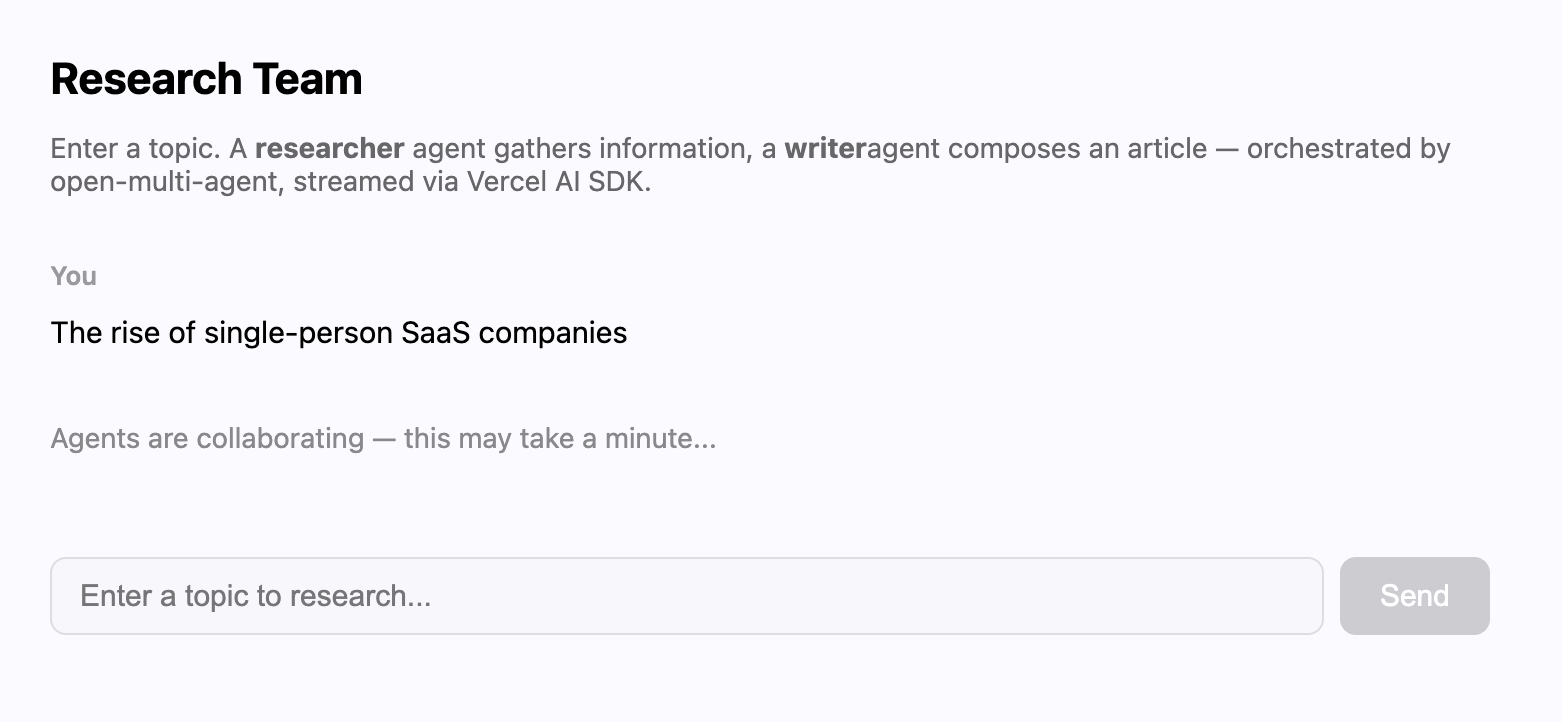
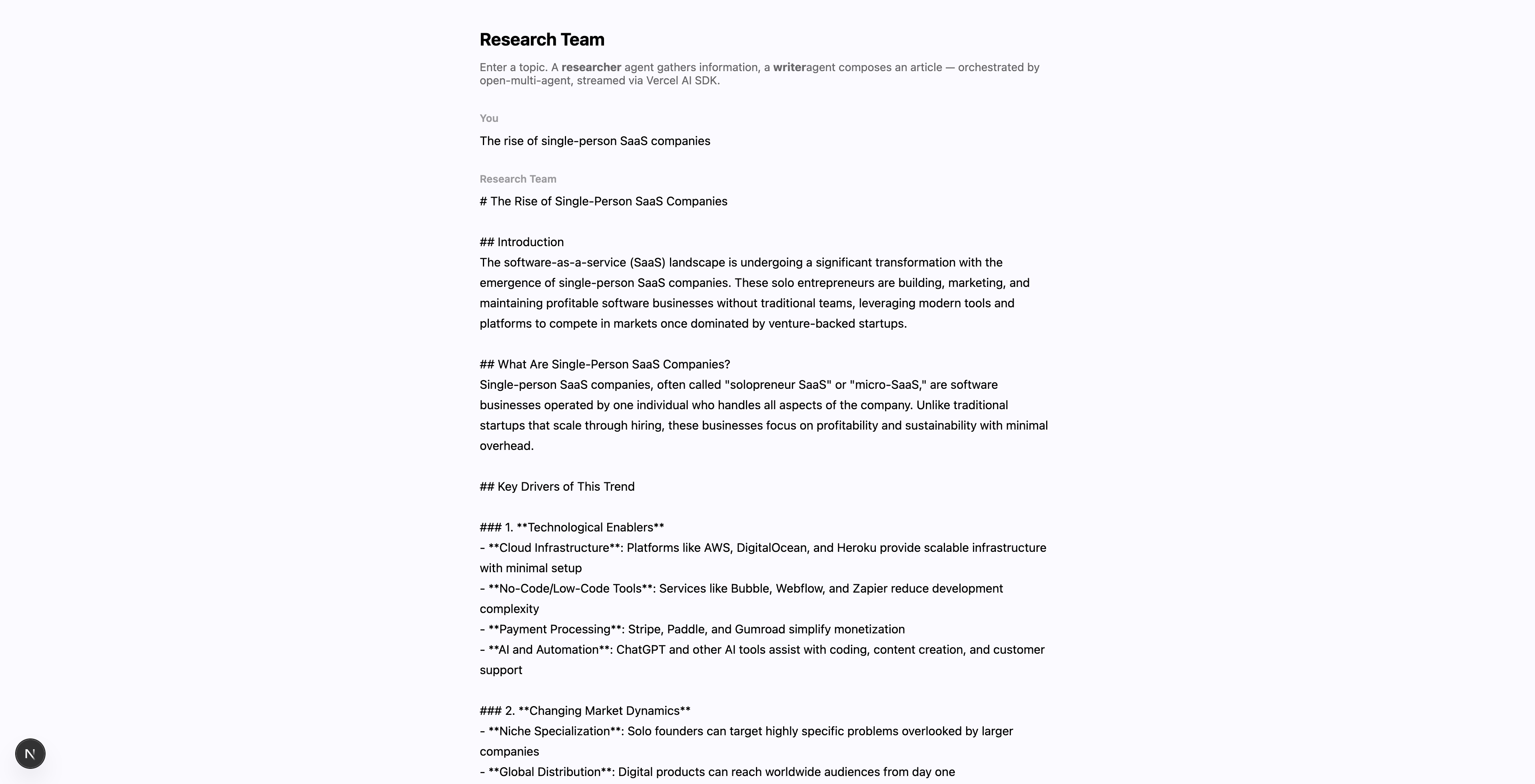
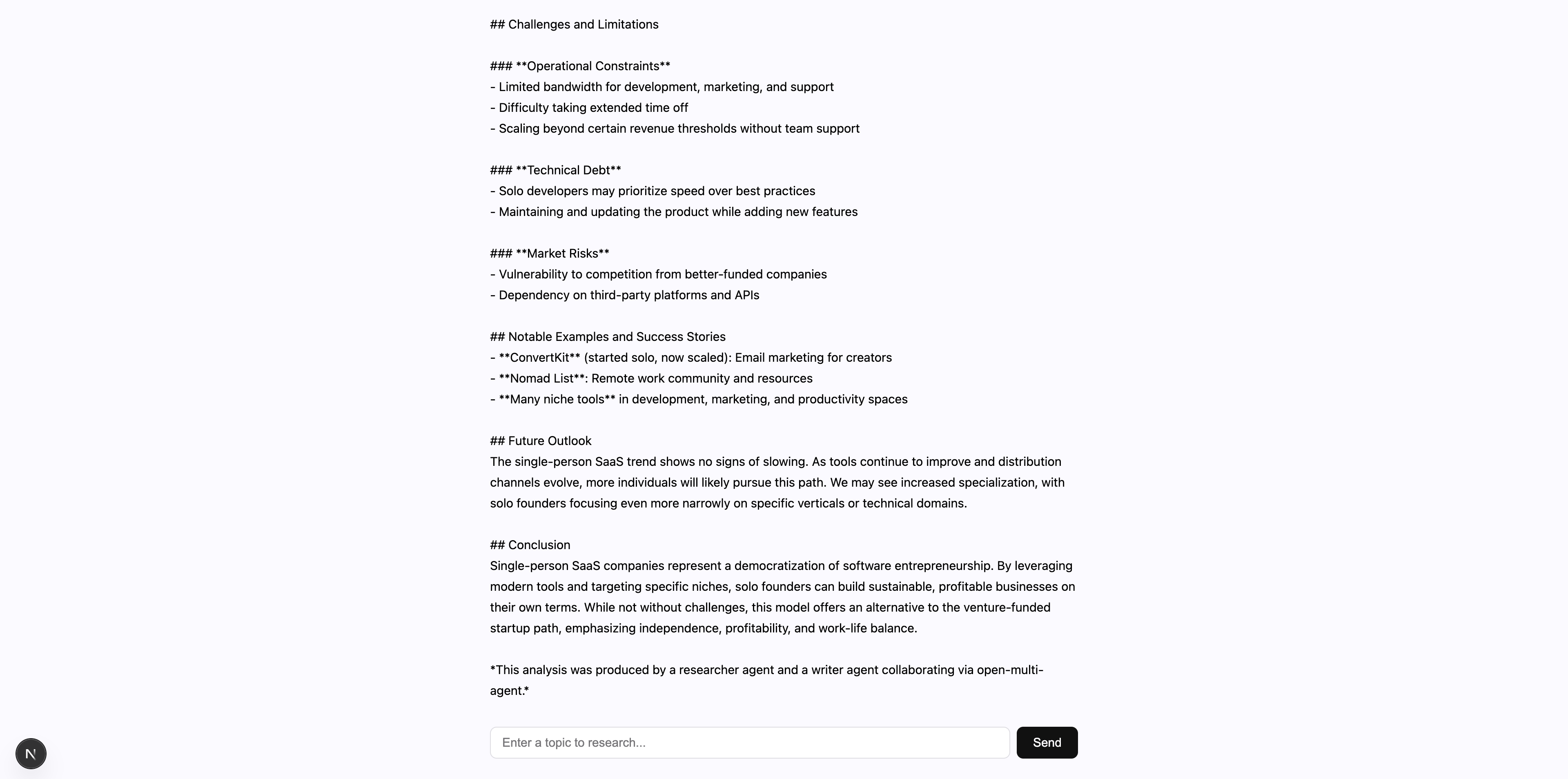
Expect a wait before anything appears. The whole orchestration phase has to finish before streamText gets a single character to work with. That’s why the status === 'submitted' branch above renders a message instead of an empty box. Seven runs of the topic above, on deepseek-v4-flash with thinking left at the model’s default, took 137-311s (median 217s) from a machine in China; the spread tracks how much article the model decides to write. Once phase 2 starts, the article arrives token by token.
One gotcha: @ai-sdk/openai’s callable provider resolves to OpenAI’s Responses API — provider('gpt-4o') gives you a Responses model, not a Chat Completions one. If your provider doesn’t support that endpoint, use @ai-sdk/openai-compatible instead, or call provider.chat('model-name') explicitly. Burned about 20 minutes on this.
Under the hood: one request through the orchestrator
The full request lifecycle:
useChatPOSTs to/api/chatwith the message historyrunTeam()starts. Coordinator agent receives the goal and the roster.- Coordinator produces a task plan via one LLM call (JSON specs with assignees and
dependsOn) TaskQueueresolves the dependency edges and starts emitting ready tasks- Researcher agent runs, output goes to
SharedMemory - Writer agent runs (reads researcher’s output from shared memory), produces the article
- Coordinator synthesizes the final output in a second call
streamText()takes that output;toUIMessageStream+createUIMessageStreamResponseput it on AI SDK’s wire protocoluseChatrenders the tokens in the browser
Steps 3-7 happen inside runTeam(). That’s where OMA earns its keep — you declare agents and a goal, it handles decomposition, ordering, and state passing.
What streams, and at what granularity
The two libraries both say “streaming” and mean different things, so it’s worth being exact about which one you get where.
On the OMA side, Agent.stream(input, runOptions?) returns an AsyncGenerator<StreamEvent>, and OrchestratorConfig.onAgentStream pushes the same events tagged with the agent name. Configuring the callback switches worker agents from agent.run() to agent.stream() for every agent dispatched through the task queue, which covers both runTeam() and runTasks(). OpenMultiAgent.runAgent() has no streaming form at all — it awaits a single AgentRunResult.
The granularity is per turn and per tool call, not token deltas. The agent loop calls adapter.chat(), never adapter.stream(), so a text event carries a whole turn’s text once that turn’s model call returns, alongside a tool_use per requested call and a tool_result per completed one. Token deltas live one layer down on LLMAdapter.stream(), which the framework paths don’t call.
Two more things onAgentStream doesn’t cover: coordinator decomposition and final synthesis both call agent.run(), and so do delegate_to_agent sub-runs. In the route above that means the browser sees nothing until the team result is in hand and streamText starts — which is exactly what phase 2 is for. If you want the wait to show progress instead, wire onAgentStream into your own UI stream and render each agent’s turns and tool calls as they land.
Egress policy stops at the AI SDK bridge
There’s a second way to combine these two libraries. Instead of giving OMA its own provider credentials, you can route an OMA agent through an AI SDK model:
import { openai } from '@ai-sdk/openai'import { AISdkAdapter } from '@open-multi-agent/core/ai-sdk'
const researcher: AgentConfig = {  name: 'researcher',  model: 'gpt-4o',  adapter: new AISdkAdapter(openai('gpt-4o')),  systemPrompt: 'You are a research specialist.',}
When adapter is set, provider, apiKey, baseURL, and region are ignored for that agent. Mixed teams work: only the agents carrying an adapter go through the AI SDK.
One constraint travels with that choice. egressPolicy, added in v1.16, restricts which origins OMA’s built-in LLM adapters may reach — mode: 'offline' for loopback only, or mode: 'allowlist' for a list of HTTP(S) origins. An AI SDK model is an opaque application-supplied transport: it exposes no reliable target-and-transport contract to OMA. So when egressPolicy is configured, OMA rejects AISdkAdapter before invocation rather than claiming it constrained a request it never saw. The failure is closed and explicit — stable code EGRESS_POLICY_UNSUPPORTED, an unsuccessful agent result with status.code: 'rejected' and errorInfo.kind: 'validation', and no retry, because another attempt can’t widen a policy.
The same rule covers any custom LLMAdapter, including one you constructed from an OMA adapter class. If you need an egress boundary underneath the bridge, it belongs in the provider’s own transport controls or an infrastructure firewall.
The two-phase route in this post is unaffected: OMA runs on the built-in openai adapter with an explicit baseURL, which is a surface egressPolicy enforces.
When you need an orchestrator on top of the AI SDK
AI SDK alone handles most single-agent work: chatbots, RAG, tool-calling agents, structured extraction. If one agent can finish the job in a single conversation loop, adding OMA would just be extra complexity.
Add OMA when you need agents collaborating — research + writing teams, multi-perspective code review, fan-out data collection, anything where one agent’s output feeds into another and the dependency graph isn’t something you want to hardcode.
Trade-offs, since every library has them:
| AI SDK | OMA | |
|---|---|---|
| Provider support | Provider-neutral by design; official + community provider packages | 13 built-in shortcuts (Anthropic, OpenAI, Azure OpenAI, Gemini, Bedrock, Copilot, Grok, DeepSeek, Doubao, Hunyuan, MiniMax, MiMo, Qiniu) plus any OpenAI-compatible endpoint |
| Budget ceilings | stopWhen / stepCountIs are step conditions | Run-level maxTokenBudget, checked at turn and task boundaries |
| Observability | experimental_telemetry emits OpenTelemetry spans | onProgress / onTrace / onAgentStream callbacks, plus an offline Run Viewer that renders a finished run as a task DAG and span waterfall |
OMA’s surface is orchestration: decomposition from a goal, dependency scheduling, shared memory, a semaphore-bounded agent pool. The AI SDK’s surface is the model call and the wire to the browser. Neither one replaces the other, which is why the route above runs both.
Full example
The working code is in the open-multi-agent repo:
Clone the repo, npm install at the root, then npm install in the example directory and set DEEPSEEK_API_KEY. npm run dev builds OMA before starting Next.js via a predev script, so there’s no separate build step.
If multi-agent orchestration is new to you, the single-agent example might be a better starting point.
Originally published ondev.to.